[URCapX] AI Accelerator Core
Warning
The AI Accelerator requires ROS 2 Humble, so PolyScope X 10.12.1 is the latest compatible release. PolyScope X 10.13 and later use ROS 2 Jazzy and are not currently supported.
The AIA Core URCapX is the central component of the AI Accelerator platform. It provides the PolyScope X UI for configuring, deploying, and managing camera and AI features, and it coordinates communication between all system components.
Why read this guide?
This page explains what AIA Core does, the other pieces it works with, and how the components are connected. Read it once to build a mental model of the platform before you follow the setup pages.
What AIA Core does
AIA Core is a PolyScope X URCapX with an Angular frontend and a set of backend containers. Its responsibilities are:
Camera discovery and selection — scans the ROS 2 graph for
*_camera/model_configtopics and lets the operator pick the active camera(s).Camera start/stop control — proxies UI actions into ROS 2
NodeControlservice calls to the camera node.Camera settings — persists and applies camera parameters (exposure, IR, laser).
Hand-eye calibration — a chessboard workflow backed by a FastAPI studio service and a dedicated ROS 2 calibration node. The result is saved to
/etc/aix_cameras/camera.yamland published as a PolyScope frame.
Platform components
The AI Accelerator is made of three cooperating URCapX / stacks. AIA Core is the control plane; the camera URCap owns the sensor; pandai_ark runs the AI (NVIDIA Isaac ROS on the Jetson — see How PandaI uses NVIDIA Isaac).
Component |
Role |
Runs on |
|---|---|---|
|
Camera configuration, selection, control, and hand-eye calibration |
AI Accelerator compute box |
Camera Creator ( |
Orbbec camera lifecycle: starts/stops the ROS 2 driver, advertises the camera |
AI Accelerator compute box |
|
Perception (RT-DETR, SAM, FoundationPose), world model, planning, web bridge |
AI Accelerator compute box (GPU) |
All three run on the AI Accelerator compute box (embedded NVIDIA Jetson Orin AGX 64GB). The frontends run in the PolyScope X teach-pendant browser on the robot controller.
How the pieces connect
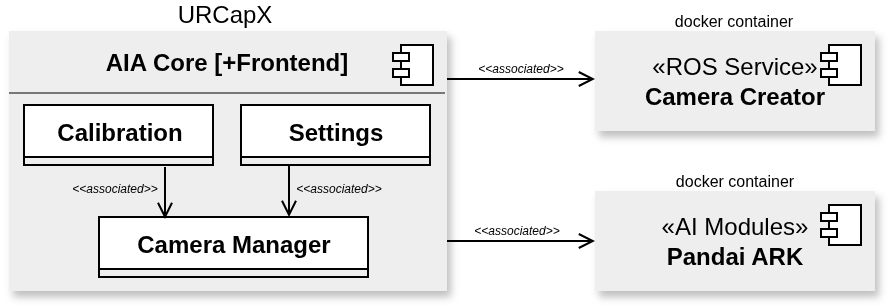
Figure 1AIAC: Overview of the system components used by the AIA Core URCapX. AIA Core (with its frontend, calibration, and settings) drives a Camera Manager that is associated with the Camera Creator (a ROS service) and the Pandai ARK AI modules, each in its own docker container.
The teach pendant hosts the Angular UIs. The compute box hosts the backends, the camera driver, and the ARK perception stack. The frontends talk to their backends over HTTP/WebSocket; everything on the compute box talks over ROS 2. The diagram below expands Figure 1AIAC into the concrete containers, ports, and ROS 2 interfaces.
        flowchart TB
    subgraph PENDANT["PolyScope X teach pendant (browser)"]
        aiafe["<b>AIA Core frontend</b><br/>Angular"]
        camfe["<b>Camera Creator frontend</b><br/>Angular + URScript preamble"]
        urctrl["<b>URControl</b><br/>robot program"]
    end

    subgraph BOX["AI Accelerator compute box (Jetson Orin AGX 64GB)"]
        subgraph CORE["aia_core_urcap"]
            flask["<b>aia-core-backend</b><br/>Flask :35000"]
            studio["<b>calib_studio-backend</b><br/>FastAPI :35001"]
            calib["<b>aia-calib-backend</b><br/>hand-eye node + bridge :30018"]
            sel["<b>camera-selector-service</b><br/>SelectCamera"]
        end
        subgraph CAM["camera_creator_urcap"]
            camsvc["<b>CameraNodeService</b><br/>NodeControl / NodeInfo / NodeList"]
            orbbec["<b>Orbbec driver</b><br/>gemini_330_series"]
        end
        subgraph ARK["pandai_ark"]
            pipe["<b>pipeline_image_node</b><br/>RT-DETR + SAM + FP"]
            wm["<b>world_model_updater</b>"]
            arkbridge["<b>ur-ros2-web-bridge</b><br/>:30017"]
        end
    end

    aiafe -- "HTTP :35000" --> flask
    aiafe -- "WebSocket :35001" --> studio
    aiafe -- "WebSocket :30018" --> calib
    camfe -- "UR Contribution API" --> urctrl
    urctrl -- "ROS 2 NodeControl" --> camsvc

    flask -- "ROS 2 SelectCamera" --> sel
    flask -- "ROS 2 NodeControl" --> camsvc
    flask -. "ROS 2 sub: model_config" .-> camsvc

    camsvc -- "ros2 launch" --> orbbec
    orbbec -- "color / depth / camera_info" --> pipe
    orbbec -- "color + camera_info" --> calib

    pipe -- "process_image" --> wm
    arkbridge -- "pub/sub/srv relay" --> ARK
    PENDANT -- "WebSocket :30017" --> arkbridge

    classDef pendant fill:#D7DDDF,stroke:#002B39,stroke-width:1.5px,color:#002B39
    classDef core fill:#FFFFFF,stroke:#002B39,stroke-width:1.5px,color:#002B39
    classDef cam fill:#F7F8F7,stroke:#8FA3AB,stroke-width:1px,color:#33484F
    classDef ark fill:#EDF1F2,stroke:#002B39,stroke-width:1.5px,color:#002B39
    class aiafe,camfe,urctrl pendant
    class flask,studio,calib,sel core
    class camsvc,orbbec cam
    class pipe,wm,arkbridge ark
The registration handshake that lets AIA Core auto-discover a camera is described on the Camera Creator page.
Containers and ports
AIA Core is deployed as four containers (from aia_core_urcap/aia-core/manifest.yaml):
Container |
Image |
Port(s) |
Protocol |
Notes |
|---|---|---|---|---|
|
|
35000 |
HTTP |
Flask REST API; ROS 2 camera discovery and control |
|
|
35001 |
WebSocket |
FastAPI calibration studio; robot motion; waypoints |
|
|
30018 (bridge), 8080 (health) |
WebSocket / HTTP |
Hand-eye calibration node + web bridge; host network, privileged |
|
|
— |
ROS 2 |
Implements |
Communication paths
From |
To |
Mechanism |
Purpose |
|---|---|---|---|
AIA Core frontend |
|
HTTP :35000 |
Camera discovery, selection, start/stop |
AIA Core frontend |
|
WebSocket :35001 |
Robot motion, waypoints, calibration save |
AIA Core frontend |
|
WebSocket :30018 |
Calibration service calls, TF subscribes |
|
|
ROS 2 |
Set the active camera(s) |
|
Camera Creator |
ROS 2 |
Start / stop / restart the camera node |
|
Camera Creator |
ROS 2 topic (subscribe) |
|
Camera driver |
|
ROS 2 topics |
|
Persistent files
AIA Core keeps state on two mounts inside its containers:
/mount(persistent) — waypoints andserver_ip.txt(remote-control flag)./etc(permanent) — hand-eye calibration at/etc/aix_cameras/camera.yaml(plus a.backup). This is the file to retrieve after calibration; it can also be read via the calib studio API (/get_calibration_info,/get_camera_calibration/<name>).
PolyScope tabs
Screenshots of the AIA Core tabs (Calibration, Setup, Results) and a short description of each will go here.
Installation
Install the following URCapX files on the PolyScope X robot, in this order. Full steps (USB and install-urcap) are in SDK — Install URCapX on the robot.
File |
Role |
|---|---|
|
This URCapX (Core UI, camera manager, calibration) |
|
Kit camera (Gemini 335Lg) |
|
SDK URScript API used by the examples |
Download the files from Centercode. The NVIDIA Isaac SDK still installs on the compute module as a .deb — that is separate from these robot packages.
Official documentation
Link to downloadable PDF documentation from the UR website.