Console UI blank window
Warning
The AI Accelerator requires ROS 2 Humble, so PolyScope X 10.12.1 is the latest compatible release. PolyScope X 10.13 and later use ROS 2 Jazzy and are not currently supported.
← Back to Troubleshooting
Symptoms
ARK Console UI opens on the compute-module desktop, but the window is entirely black (no camera image). This often appears when running Auto Annotation:
./scripts/run_tool_auto_annotation.sh
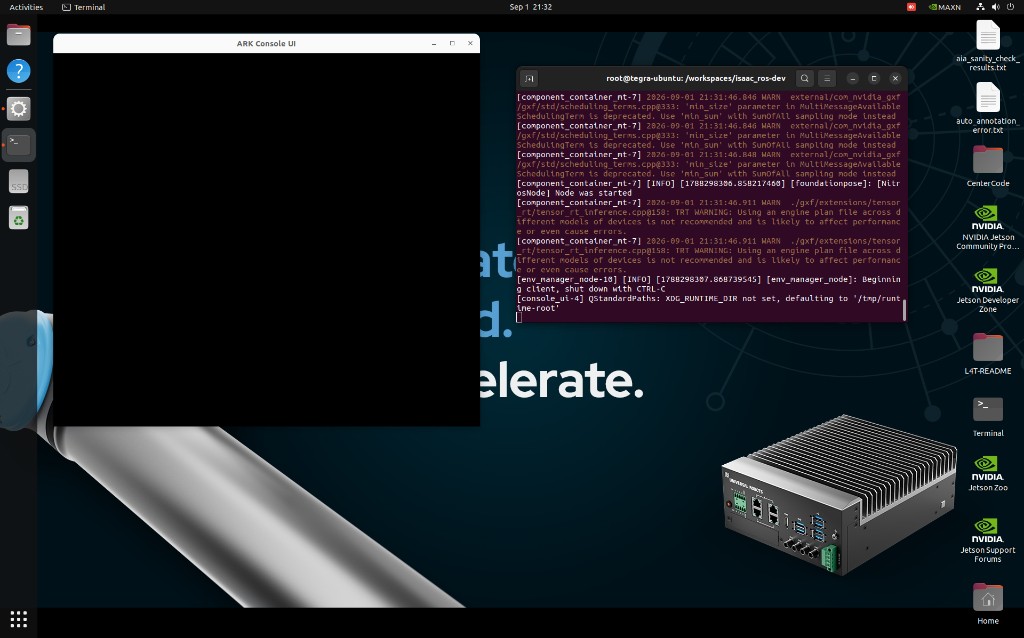
Blank Console UI after launch. The Qt window started (title bar is visible); the image pane stays black until RGB frames arrive.
The image pane is empty by design until console_ui receives a camera message. Detection / classification buttons may still be visible below the black view. Auto Annotation also opens a second OpenCV window (keys R / L / P); annotation happens there, not in Console UI. See Auto Annotation.
Cause
The Qt application started, but no RGB frames reached console_ui. The launch remaps /image_topic to a serial-derived camera name from config/config.yaml:
/{robot_serial}_camera/color/image_raw
If that topic is silent, on another ROS domain, or named for a different serial, the pane never updates.
Typical causes, in order:
robot_serialdoes not match the live camera namespace. Camera Creator publishes under the connected robot’s serial. A stale serial inconfig.yaml(for example the SDK example value) puts the UI on the wrong topic.ros_domain_iddoes not match the robot / camera containers. It must match PolyScope Settings → Services and the camera / AIA Core containers. Wrong domain: Isaac nodes see each other, but not the camera.Camera is not streaming. USB/GMSL not claimed, camera never started in AIA Core, camera plugged in after the container started, or Orbbec Viewer still holding the device.
Unsupported PolyScope X. This SDK is ROS 2 Humble. 10.12.1 is the last compatible PolyScope X release; 10.13 and later use Jazzy.
Fix
On the robot: note serial (About) and the ROS domain ID under Settings → Services.
On the compute module, edit
~/aia_sdk/ros/config/config.yaml:robot_serial— e.g.UR20255500010ros_domain_id— same value as on the robot
Restart:
cd ~/aia_sdk/ros
./scripts/run_sdk_setup.sh
See SDK for full config details.
If the camera was connected after the container started, restart the camera node or the full pipeline. If Orbbec Viewer is open, close it so the ROS camera driver can claim the device — see Orbbec Viewer.
Confirm the camera topic (inside the SDK container)
# Confirm serial/domain in config
grep -E 'robot_serial|ros_domain_id' /workspaces/isaac_ros-dev/config/config.yaml

# What is actually publishing?
ros2 topic list | grep camera

# Does the remapped topic have data? Use the serial from config.yaml / the pendant
ros2 topic echo /<ROBOT_SERIAL>_camera/color/image_raw --once
ros2 topic hz /<ROBOT_SERIAL>_camera/color/image_raw

ros2 node info /console_ui
ros2 topic info /<ROBOT_SERIAL>_camera/color/image_raw --verbose
If echo returns an image, config.yaml and DDS are aligned; look at camera start / USB next. If it times out, fix serial, domain, or the camera driver before treating the UI as broken.
On the Jetson host (user lab), run debug_camera_connection.sh from Utility scripts with ROBOT_SERIAL set to the pendant About serial. That walks USB → Orbbec driver → ROS topics.
If ros2 topic echo does return an image and the window is still fully black (no buttons either), that is a rarer Qt display issue, not a topic mismatch.