GMSL
Warning
The AI Accelerator requires ROS 2 Humble, so PolyScope X 10.12.1 is the latest compatible release. PolyScope X 10.13 and later use ROS 2 Jazzy and are not currently supported.
Version 2 of the AI Accelerator includes support for GMSL connectivity to the Orbbec Gemini 335Lg camera, for a more robust industrialized connection.
To switch the camera from USB to GMSL:
Remove the small cover on the camera to expose the mode switch (shown below next to the white connector).
Slide the switch from U (USB) to M (GMSL / MIPI).
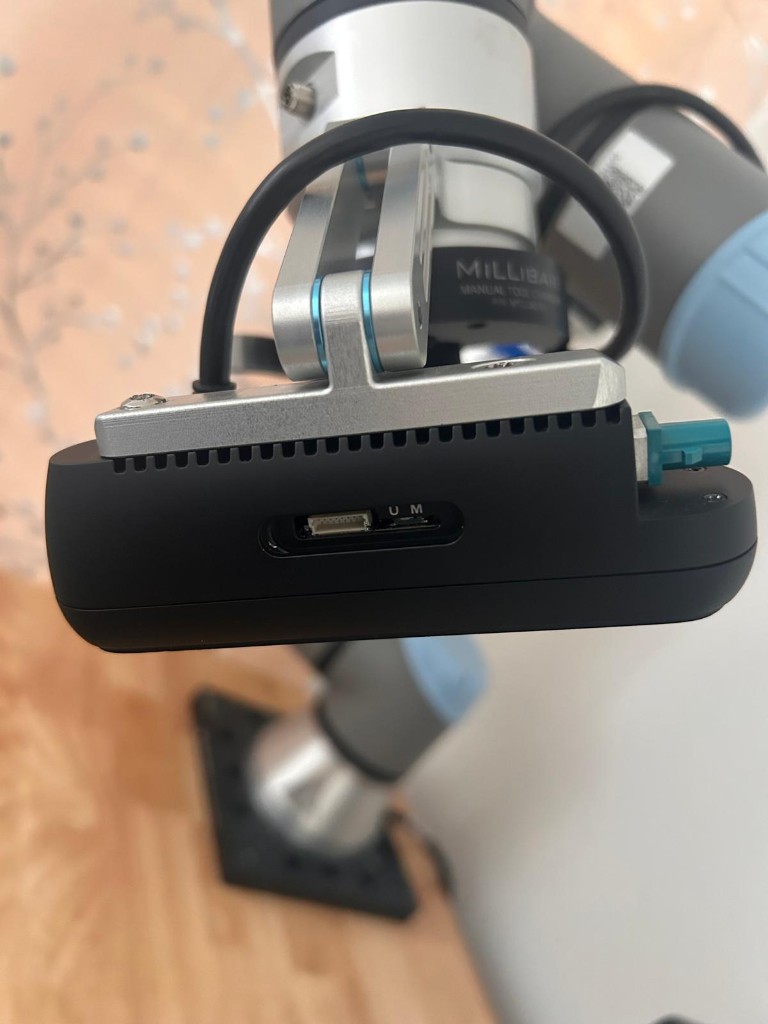
In the photo above, the switch is set to U (USB). Move it to M to enable GMSL.
If you received your AI Accelerator running v1 software, you will need to purchase a new GMSL cable to run GMSL in production. There is a short GMSL cable in the camera box that can be used for initial testing, but it is too short when the camera is mounted on the robot.
We recommend this Amphenol GMSL cable, available from Mouser in multiple regions:
https://www.mouser.com/ProductDetail/Amphenol-RF/095FJZFJZAHM500?qs=zW32dvEIR3tNWGigthv62Q%3D%3D
After camera wiring, continue with the SDK setup (or return to Getting started). To confirm RGB and depth on the compute box before ROS, see Orbbec Viewer.